If you’ve spent more than five minutes in the world of digital marketing, you’ve heard the term “SEO” thrown around like it’s one single thing. It’s not. Search engine optimization is a broad discipline with several distinct branches, each solving a different problem. Two of the most commonly confused — and most critical — are technical SEO and on-page SEO.
Learn more about – https://rankgrow.in/search-engine-optimization-presentation-2026/
Understanding the difference between them isn’t just academic. It’s the difference between a site that could rank and one that does.
Table of Contents
The Four Types of SEO in Digital Marketing
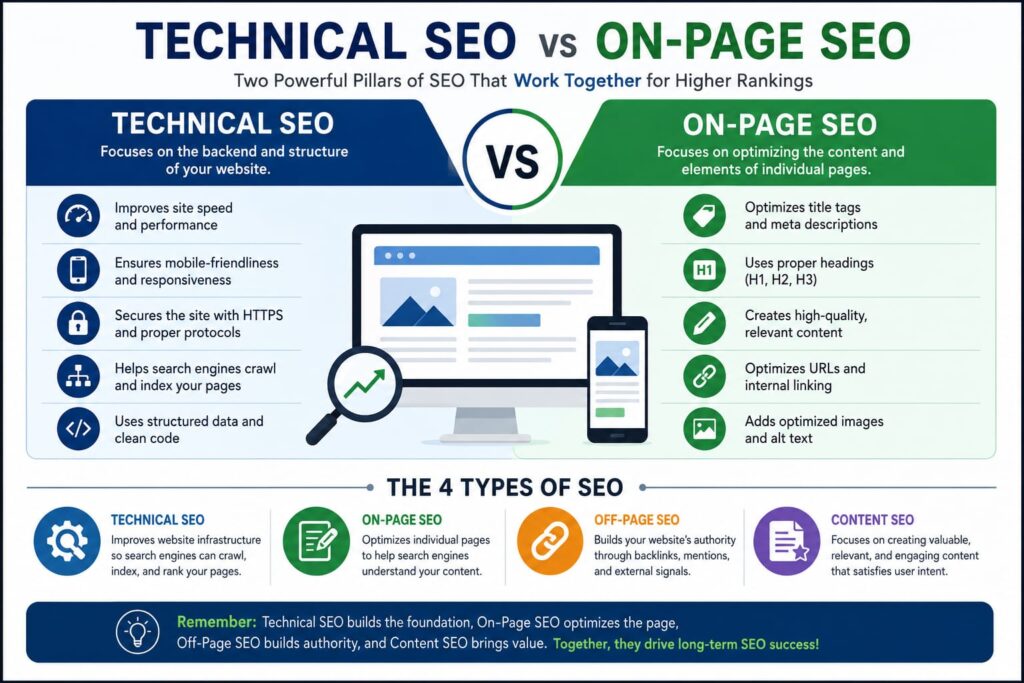
Before diving into the technical vs. on-page debate, it helps to see the full picture. Most SEO professionals recognize four core types of SEO:
- Technical SEO — Optimizing the infrastructure of your website so search engines can crawl and index it effectively.
- On-Page SEO — Optimizing the content and HTML elements on individual pages to improve relevance and user experience.
- Off-Page SEO — Building authority through external signals like backlinks, brand mentions, and social signals.
- Local SEO — Optimizing for location-based searches, particularly important for brick-and-mortar businesses.
Each type serves a specific function. Think of it like a car: technical SEO is the engine, on-page SEO is the steering, off-page SEO is the fuel, and local SEO is the GPS. You need all of them working together — but the engine and steering are usually where things break down first.
What Is Technical SEO?
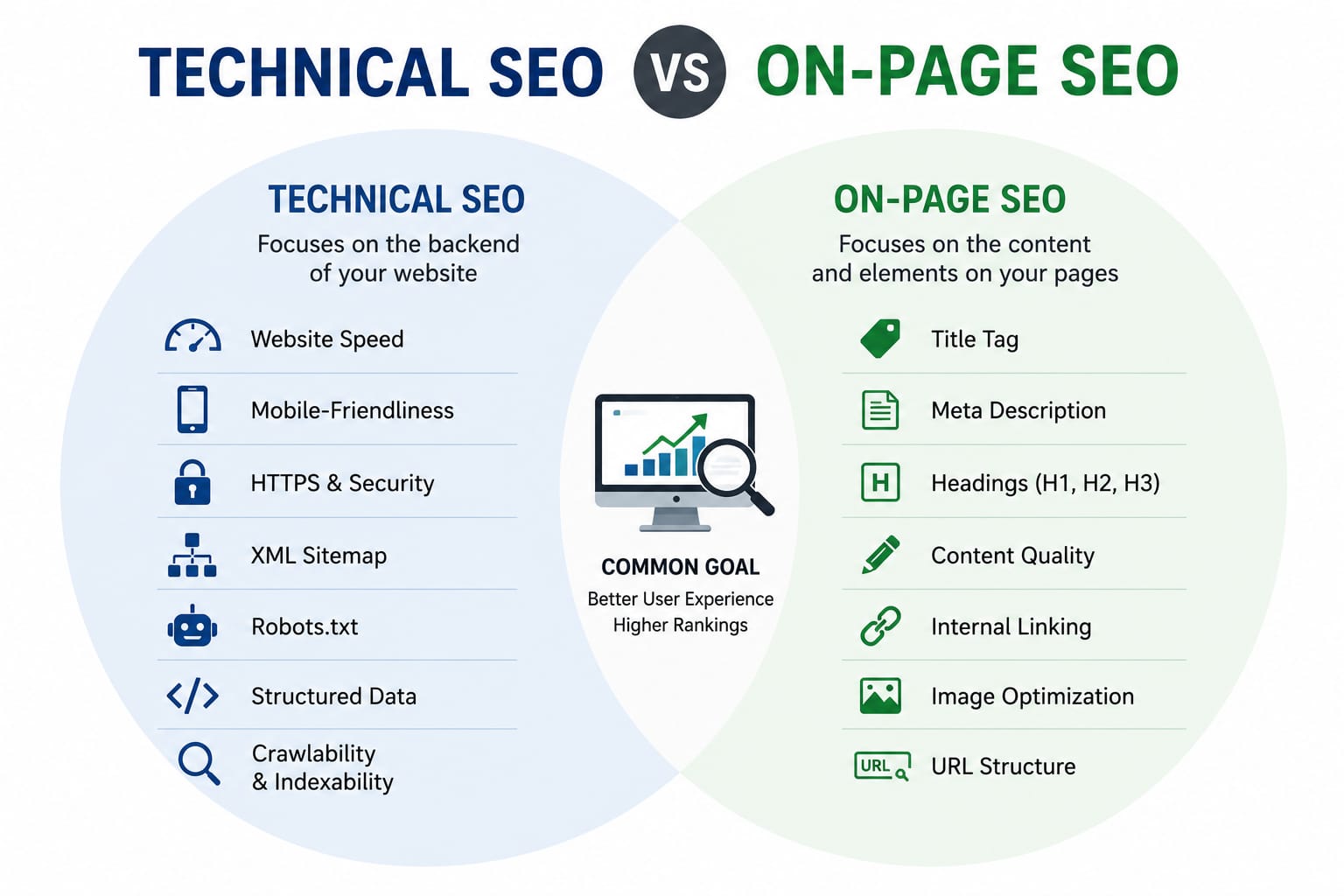
Technical SEO refers to everything that happens behind the scenes of your website — the structural and server-level elements that determine whether search engines can find, crawl, interpret, and index your content at all.
No matter how brilliant your content is, if Googlebot can’t access your pages, you won’t rank. Full stop.
Core Elements of Technical SEO
Crawlability and Indexation Your robots.txt file tells search engine bots which pages to crawl and which to ignore. Your XML sitemap helps them discover all the pages you want indexed. Getting these two files wrong is one of the most common — and most damaging — technical SEO mistakes.
Site Speed and Core Web Vitals Google uses Core Web Vitals as a ranking signal. These metrics measure real-world user experience: how fast your page loads (Largest Contentful Paint), how quickly it responds to input (Interaction to Next Paint), and how much the layout shifts during loading (Cumulative Layout Shift). According to Google’s own documentation, pages meeting Core Web Vitals thresholds are more likely to be surfaced in search results.
HTTPS and Site Security Google confirmed HTTPS as a ranking signal back in 2014, and today it’s essentially table stakes. A site without SSL sends both users and search engines a clear message — and it’s not a flattering one.
Mobile-Friendliness Google operates on a mobile-first indexing model, meaning it primarily uses the mobile version of your site for ranking and indexing. A site that breaks on a phone is a site that struggles in search.
Structured Data (Schema Markup) Schema markup is code added to your HTML that helps search engines understand your content more precisely. It can enable rich results — star ratings, FAQs, product prices — directly in the SERPs, improving both visibility and click-through rates.
Duplicate Content and Canonical Tags When multiple URLs serve the same or similar content, search engines split ranking signals across them. Canonical tags (rel="canonical") tell Google which version of a page is the “master,” consolidating authority where you want it.
Crawl Budget For larger sites, how many pages Google crawls in a given window matters. Wasting crawl budget on thin or duplicate pages means important pages may get crawled less frequently.
What Is On-Page SEO?
On-page SEO is the practice of optimizing the visible elements of a web page — the content, HTML tags, internal links, and user experience signals — to align with what both search engines and users are looking for.
If technical SEO is about getting search engines into your site, on-page SEO is about making sure they understand what they find once they’re there.
Core Elements of On-Page SEO
Title Tags and Meta Descriptions The title tag is still one of the strongest on-page ranking signals. It should include your primary keyword naturally, stay under 60 characters, and accurately describe the page content. Meta descriptions don’t directly affect rankings but significantly influence click-through rates.
Header Tags (H1–H6) A clear heading hierarchy helps both users and crawlers understand page structure. Your H1 should appear once per page and reflect the primary topic. H2s and H3s organize subtopics, improve readability, and create natural opportunities for secondary keywords.
Content Quality and Keyword Relevance Google’s Helpful Content system (now integrated into its core algorithm) evaluates whether content was created primarily to help people or primarily to rank. Thin, generic, or AI-spun content that doesn’t genuinely answer user intent is increasingly penalized. Depth, accuracy, and originality matter more than ever.
Keyword Placement and Density Keyword stuffing is a relic of early 2000s SEO. Today, the goal is natural placement: target keyword in the title, first 100 words, and a few times throughout — but only where it reads naturally. Semantic variation (using related terms and synonyms) signals topical authority more effectively than keyword repetition.
Internal Linking Internal links distribute page authority across your site and help users navigate to related content. A well-planned internal linking structure can significantly boost the rankings of deeper pages that otherwise struggle to attract backlinks.
Image Optimization Images should include descriptive alt text (which also helps accessibility), be compressed for fast loading, and be named descriptively. Lazy loading images below the fold improves page performance without sacrificing visual richness.
URL Structure Clean, descriptive URLs — like /technical-seo-guide/ rather than /page?id=4821 — are easier for both users and search engines to understand. Keep them short, lowercase, and keyword-relevant.
User Experience Signals Google increasingly factors in behavioral signals: dwell time, bounce rate, and engagement. On-page SEO isn’t just about tags and keywords anymore — it’s about creating pages that people actually want to spend time on.
Technical SEO vs On-Page SEO: Key Differences
| Factor | Technical SEO | On-Page SEO |
|---|---|---|
| Focus | Site infrastructure | Page content & HTML |
| Who does it | Developers + SEOs | Content creators + SEOs |
| Tools used | Screaming Frog, Google Search Console, PageSpeed Insights | Surfer SEO, Yoast, SEMrush |
| Affects | Crawlability, indexation, speed | Relevance, click-through rate, engagement |
| Frequency | Periodic audits + ongoing monitoring | Per-page, ongoing content updates |
| Visibility to users | Mostly invisible | Directly visible |
The key insight: technical SEO creates the conditions for ranking; on-page SEO earns the ranking.
How They Work Together
Here’s a real-world scenario. You write a genuinely excellent, deeply researched article on a competitive topic. Strong keyword targeting, well-structured headers, compelling meta description — your on-page SEO is solid.
But your site loads in 6 seconds. Your robots.txt is accidentally blocking the /blog/ directory. You have dozens of duplicate pages from URL parameters that are eating your crawl budget.
Result? Google may never properly index your excellent article. Or it indexes a slow, unstable version of it that doesn’t pass Core Web Vitals thresholds. The on-page work was wasted because the technical foundation was broken.
The reverse is also true. A technically perfect site with thin, unhelpful content will still struggle to rank. Google’s algorithms are sophisticated enough to distinguish between pages that are crawlable and pages that are genuinely valuable.
Both disciplines are non-negotiable.
Off-Page SEO: The Third Pillar
It’s worth briefly addressing off-page SEO, since it often gets lumped in with technical SEO in beginner-level discussions.
Off-page SEO covers signals that exist outside your website: backlinks from other domains, brand mentions, reviews, and social signals. Backlinks remain one of Google’s strongest ranking factors. A page with strong on-page and technical SEO, supported by authoritative backlinks, is nearly always going to outperform an equivalent page with no external authority.
Off-page SEO is earned, not configured. You can’t set it up in a CMS dashboard — it’s built through content worth linking to, PR, partnerships, and genuine reputation in your industry.
How to Conduct a Basic Technical SEO Audit
A technical SEO audit doesn’t require an enterprise tool subscription. Here’s a practical starting framework:
Step 1: Check Indexation Use Google Search Console’s Index Coverage report to see which pages are indexed, excluded, or throwing errors. The “Excluded” tab often reveals crawling issues that are silently killing your visibility.
Step 2: Audit Site Speed Run your key pages through Google’s PageSpeed Insights (pagespeed.web.dev). Pay attention to your Core Web Vitals scores, especially on mobile.
Step 3: Review Your robots.txt and Sitemap Visit yourdomain.com/robots.txt and yourdomain.com/sitemap.xml directly. Confirm that your important pages aren’t being blocked, and that your sitemap is submitted in Google Search Console.
Step 4: Check for Broken Links and Redirect Chains Tools like Screaming Frog (free up to 500 URLs) can crawl your site and identify 404 errors, redirect chains, and missing canonical tags.
Step 5: Verify Mobile Usability Google Search Console includes a Mobile Usability report that flags specific pages with touch element issues, font size problems, or viewport configuration errors.
Step 6: Look for Duplicate Content Check for www vs. non-www, HTTP vs. HTTPS, and trailing slash vs. no trailing slash versions of your pages. All variations should redirect to a single canonical version.
Common Mistakes That Blur the Line
One reason people confuse technical and on-page SEO is that some elements touch both disciplines.
Page speed, for instance, is influenced by server configuration (technical) and by image sizes on the page (on-page). Internal links are an on-page decision but affect crawl paths (technical). Schema markup lives in the HTML (technical) but describes the content on the page (on-page).
This overlap is actually good news: improving one area often lifts the other. Compressing images speeds up your pages and reduces server load. Improving internal linking helps users navigate and helps bots crawl more efficiently.
Think of technical and on-page SEO not as competing disciplines, but as two lenses trained on the same website.
Final Thoughts
Technical SEO and on-page SEO aren’t alternatives — they’re partners. One makes your site accessible to search engines; the other makes it worth ranking. Neglect either one, and you’re leaving traffic on the table.
For most websites, the smartest approach is to fix technical issues first (since they can block ranking entirely), then focus on on-page optimization to improve relevance and user engagement. From there, off-page SEO through link building compounds everything you’ve built.
The good news? You don’t need to be an engineer to handle technical SEO fundamentals, and you don’t need to be a professional copywriter to do on-page SEO well. What you do need is a clear understanding of what each type does — and now you have it.
Frequently Asked Questions
1. What is the main difference between technical SEO and on-page SEO?
Technical SEO optimizes a website’s infrastructure (crawlability, speed, indexability), while on-page SEO optimizes individual page content (keywords, titles, headings) to match search intent.
2. Is technical SEO more important than on-page SEO?
Neither is inherently “more important” — but technical SEO is usually the prerequisite. If a page isn’t crawlable or indexable, on-page optimization on that page won’t matter until the technical issue is fixed.
3. What comes first, technical SEO or on-page SEO?
Technical SEO typically comes first, especially for new or struggling sites. Start with a technical audit to confirm pages are indexable and fast, then layer on-page optimization on top.
4. What are some examples of technical SEO?
Examples include XML sitemaps, robots.txt configuration, canonical tags, Core Web Vitals optimization, HTTPS implementation, structured data/schema markup, and mobile responsiveness.
5. What are some examples of on-page SEO?
Examples include title tags, meta descriptions, header tag structure, keyword placement, internal linking, image alt text, and content that matches search intent.
6. Can on-page SEO work without technical SEO?
Only partially. A page can have excellent content but still fail to rank — or even get indexed — if it sits behind technical barriers like blocked crawling, slow load times, or incorrect canonical tag.

Shivam Pandey is an SEO Specialist and Digital Marketing professional passionate about helping businesses improve their online visibility. He shares practical insights on SEO, content marketing, digital marketing strategies, and the latest industry trends to help marketers and businesses grow online.