

Introduction
If you’ve created a website but it’s not getting traffic from Google, you’re probably wondering how to add keywords to website correctly.
Many beginners think SEO is only about placing keywords everywhere on a page. Unfortunately, that’s one of the biggest mistakes you can make. Modern SEO is about helping search engines understand your content while providing real value to users.
When keywords are added strategically, they help Google understand your page’s topic and match it with relevant searches. However, when they’re overused, they can actually hurt your rankings.
In this guide, you’ll learn exactly where to place keywords, how often to use them, which tools to use for keyword research, and the best practices followed by SEO professionals.
Table of Contents
What Are Website Keywords?
Website keywords are the words and phrases people type into search engines like Google when looking for information, products, or services.
For example:
- how to add keywords to website
- SEO for beginners
- keyword optimization
- on-page SEO
- website SEO tips
Google uses these keywords to understand what your page is about and determine whether it should appear in search results.
Why Are Keywords Important for SEO?
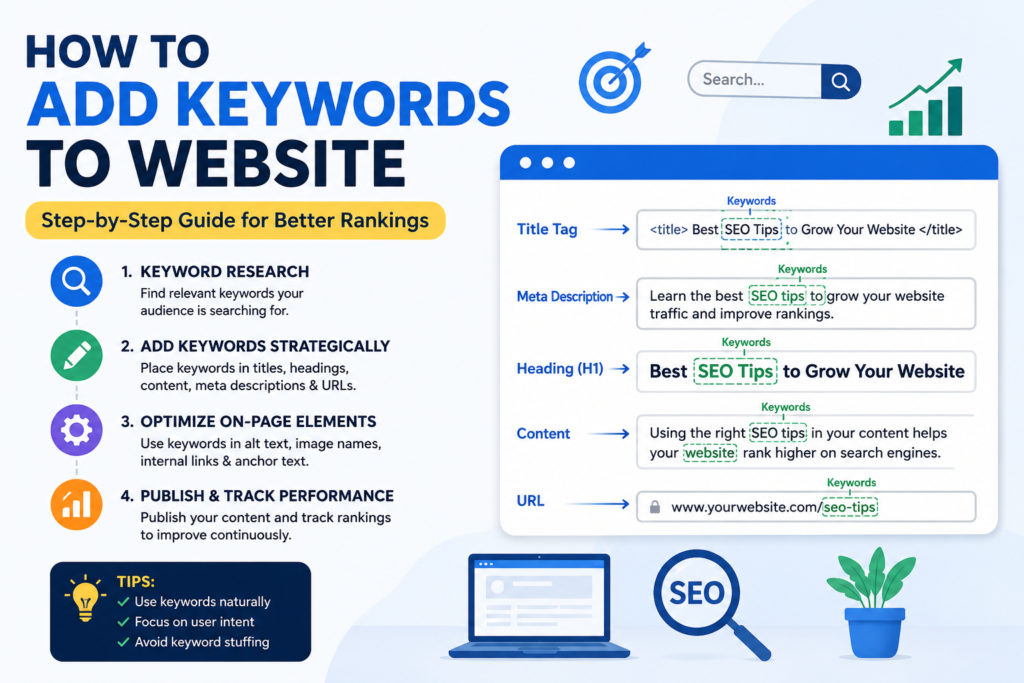
Keywords help search engines connect your content with users’ search intent.
Benefits of adding keywords correctly:
- Improves Google rankings
- Increases organic traffic
- Helps search engines understand your content
- Improves click-through rate (CTR)
- Attracts the right audience
- Supports topical authority
Featured Snippet: Keywords should be placed naturally in important SEO elements like the title tag, headings, URL, introduction, meta description, image alt text, and throughout the content where relevant.
Step 1: Find the Right Keywords
Before adding keywords, you need to know what your audience is searching for.
Use keyword research tools such as:
- Google Keyword Planner
- Google Search Console
- Google Trends
- Ahrefs
- Semrush
- Ubersuggest
- AnswerThePublic
Choose keywords based on:
- Search volume
- Keyword difficulty
- Search intent
- Relevance
- Competition
Example
Primary keyword:
how to add keywords to website
Supporting keywords:
- website keywords
- SEO keywords
- keyword placement
- on-page SEO
- keyword optimization
- add keywords in HTML
- WordPress SEO
- SEO checklist
Step 2: Add Keywords to the Page Title
Your page title is one of the strongest ranking signals.
Example
✅ Good:
How to Add Keywords to Website: Complete SEO Guide
❌ Bad:
Website Tips and Tricks
Best Practices
- Keep under 60 characters
- Include the primary keyword near the beginning
- Make it attractive for users
Step 3: Add Keywords in the URL
A clean URL helps both users and search engines.
Example:
yourwebsite.com/how-to-add-keywords-to-website
Avoid:
yourwebsite.com/post?id=2345
Keep URLs:
- Short
- Descriptive
- Keyword-focused
- Easy to read
Step 4: Optimize the Meta Description
Although meta descriptions are not a direct ranking factor, they significantly improve click-through rates.
Example:
Learn how to add keywords to your website correctly with this beginner-friendly SEO guide. Improve rankings using proven keyword placement techniques.
Keep it between 150–160 characters.
Step 5: Use Keywords in Your H1 Heading
Every page should have one H1.
Example:
How to Add Keywords to Website
The H1 should clearly describe the topic.
Step 6: Add Keywords in H2 and H3 Headings
Headings improve readability and SEO.
Example:
Where to Add Keywords
Keywords in Title
Keywords in URL
Keywords in Images
Keywords in Content
Google uses headings to understand page structure.
Step 7: Add Keywords Naturally in the First 100 Words
Search engines pay special attention to the beginning of your article.
Example:
If you’re wondering how to add keywords to your website, you’ve come to the right place. In this guide, you’ll learn the best SEO practices for keyword placement.
Don’t force the keyword.
Step 8: Use Keywords Throughout the Content
Instead of repeating the same keyword multiple times, use it naturally.
Example:
Instead of writing:
Add keywords to website. Keywords help website. Website keywords improve SEO.
Write:
Adding relevant SEO keywords throughout your website helps search engines understand your content and improves visibility in search results.
Step 9: Add Semantic Keywords
Google understands related terms.
Instead of repeating:
- how to add keywords to website
Also use:
- SEO optimization
- website optimization
- search engine optimization
- keyword research
- keyword placement
- content optimization
- search visibility
- organic traffic
- Google rankings
- user intent
- meta tags
- title tags
- internal linking
- website content
- SEO strategy
These semantic keywords improve topical relevance.
Step 10: Optimize Images
Images also contribute to SEO.
Rename image files:
Instead of:
IMG001.jpg
Use:
how-to-add-keywords-to-website.jpg
Add descriptive alt text:
How to add keywords to website for SEO
Compress images to improve loading speed.
Step 11: Add Keywords to Image Captions (When Relevant)
Captions help users understand visuals.
Example:
Example showing keyword placement in a website page.
Step 12: Optimize Anchor Text
When linking internally, use descriptive anchor text.
Example:
Instead of:
“Click here”
Use:
“Learn more about on-page SEO techniques.”
This improves navigation and helps search engines understand linked pages.
Step 13: Add Internal Links
Internal linking distributes authority across your website and improves user experience.
Suggested Internal Links
If you publish related content, link naturally to articles such as:
- What Is On-Page SEO?
- Technical SEO Checklist
- Keyword Research Guide
- SEO Content Writing Tips
- How to Improve Core Web Vitals
- Meta Tags Explained
- SEO Audit Checklist
- Beginner’s Guide to Google Search Console
Use descriptive anchor text instead of generic phrases like “read more.”
Step 14: Add External Authority Links
Linking to trusted sources can improve the credibility of your content.
Consider referencing authoritative resources such as:
- Google Search Central documentation
- Google Search Central SEO Starter Guide
- Google Search Console Help
- Google PageSpeed Insights
- Google Analytics Help Center
Only link to relevant, high-quality sources that support your content.
Step 15: Avoid Keyword Stuffing
Keyword stuffing is the practice of unnaturally repeating keywords.
Example of keyword stuffing
How to add keywords to website is important because adding keywords to website helps website keywords rank better.
Instead, write naturally for users first.
Step 16: Match Search Intent
Before optimizing a page, identify why users are searching.
For this keyword, search intent is informational.
Users want to learn:
- where to place keywords
- how many keywords to use
- beginner SEO tips
- common mistakes
- SEO best practices
Answer these questions clearly to satisfy user intent.
Common Mistakes Beginners Make
Avoid these common SEO errors:
- Adding too many keywords
- Ignoring search intent
- Not using headings properly
- Writing thin content
- Forgetting internal links
- Missing image optimization
- Not optimizing meta descriptions
- Using duplicate title tags
- Publishing without keyword research
- Neglecting mobile optimization
SEO Checklist for Keyword Placement
Use this checklist before publishing:
- Primary keyword in title tag
- Keyword in URL
- Keyword in H1
- Keyword in first paragraph
- Keyword in H2 headings where appropriate
- Semantic keywords included
- Optimized meta description
- Image file names optimized
- Image alt text added
- Internal links included
- External authority links added
- Readable content with short paragraphs
- Mobile-friendly formatting
- Fast page speed
Frequently Asked Questions (FAQs)
How many keywords should I add to a webpage?
Focus on one primary keyword and several closely related secondary keywords. Write naturally instead of targeting a fixed keyword count.
Where should I place keywords on my website?
Important locations include:
- Title tag
- URL
- H1 heading
- Introduction
- Subheadings
- Body content
- Meta description
- Image alt text
- Anchor text (when relevant)
Can I rank without adding keywords?
Quality content is essential, but keywords help search engines understand your page. Without clear keyword optimization, ranking for relevant searches becomes more difficult.
What is keyword stuffing?
Keyword stuffing is the excessive repetition of the same keyword to manipulate rankings. It creates a poor user experience and may negatively affect SEO.
Should every page target the same keyword?
No. Each page should target a unique primary keyword to avoid keyword cannibalization and improve topical coverage.
Final Thoughts
Learning how to add keywords to your website is one of the most valuable SEO skills for beginners. By placing keywords strategically—in your title, URL, headings, introduction, images, and throughout well-written content—you make it easier for search engines to understand your pages and for users to find the information they need.
Remember, successful SEO isn’t about repeating keywords. It’s about creating helpful, relevant, and trustworthy content that satisfies search intent while following technical and on-page best practices.
As your website grows, continue researching new keywords, updating older articles, building internal links, and monitoring performance through Google Search Console. Consistent optimization delivers better long-term results than quick fixes.
Call to Action
Ready to improve your website’s SEO? Start by optimizing one page today using the techniques in this guide. Then perform a full keyword audit across your website, update your content with strategic keyword placement, and monitor your progress over time. Small, consistent improvements can lead to significant increases in organic traffic and search visibility.

Shivam Pandey is an SEO Specialist and Digital Marketing professional passionate about helping businesses improve their online visibility. He shares practical insights on SEO, content marketing, digital marketing strategies, and the latest industry trends to help marketers and businesses grow online.